SHADING BUSINESS SOFTWARE

Features

A quote is more than a total. It combines customer details, measurements, specifications, your own price list and your company’s presentation. HEVU connects these parts so that preparing the quote and moving to the next stage of the job can rely on the same information. Each part supports a practical step in your daily work.

HEVU teaches you how to use HEVU.

You do not need to arrange separate training to get started. The detailed built-in guide takes you through the real workspace using your own data.

Built around shading work: surveys, your price list, product choices, quotations and installation. The guide follows the same practical workflow.

Still have a question? Contact us.
  1. Set up your business

    Company details, branding and your own price list. Learn manual price entry as well as importing.

  2. Complete a real quotation

    Choose dimensions, specification, operation and colour. Check the price and drawing, save your work and create a multilingual PDF.

  3. Follow through to installation

    Customer history, CRM, personal tasks and installation routes. Guidance for managing company licences is included too.

Learn at your own pace. Pause, resume or restart the guide whenever you need it.

Your products, your prices, your logo.

Every part of your quote belongs together.

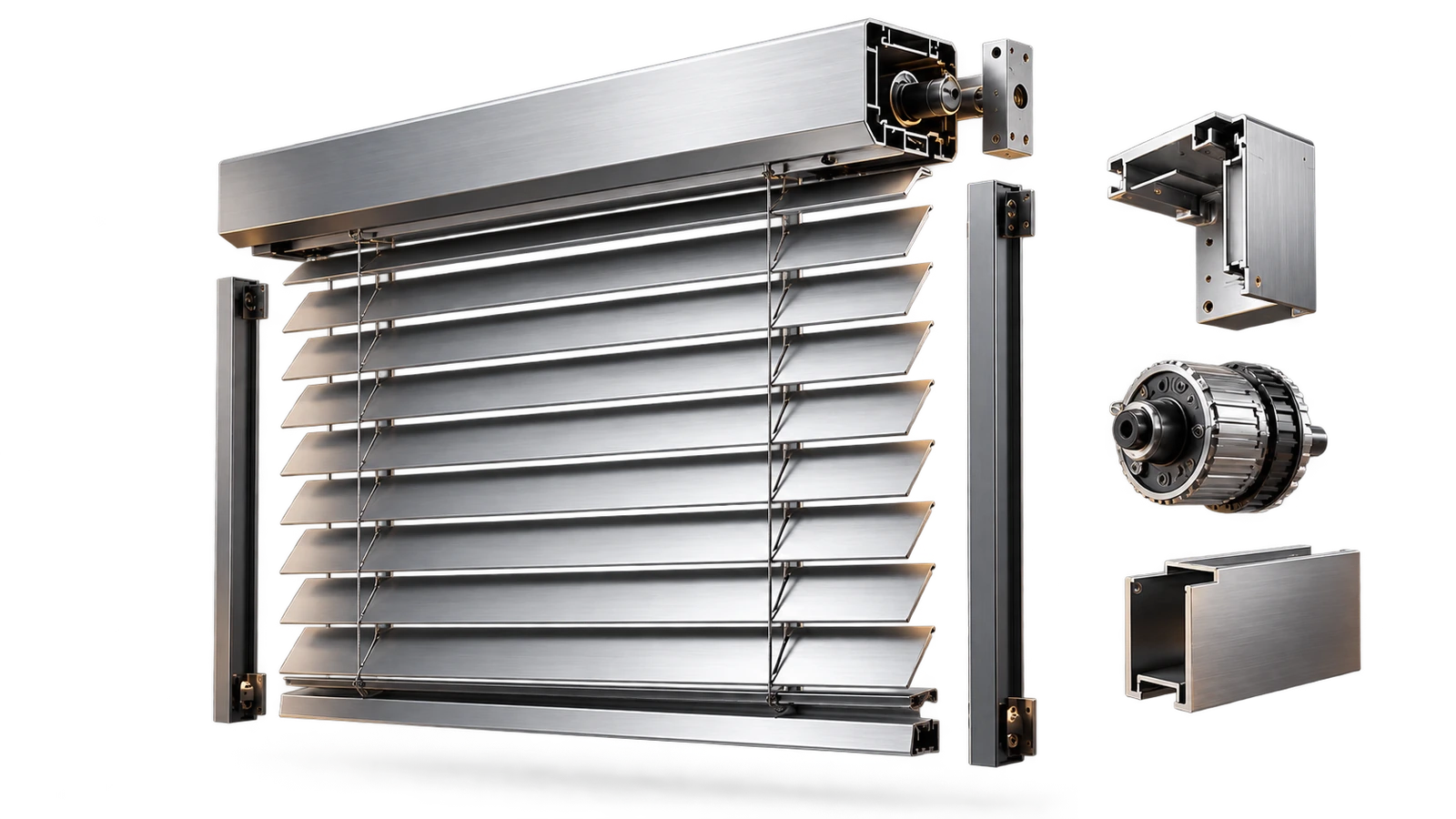
Illustrative product visual
01Cassette and depthCalculated with your prices
02SlatsCalculated with your prices
03Guide railCalculated with your prices
04Motor and controlsCalculated with your prices
05Colour and finishCalculated with your prices

Features / 01

Quotes with your own branding

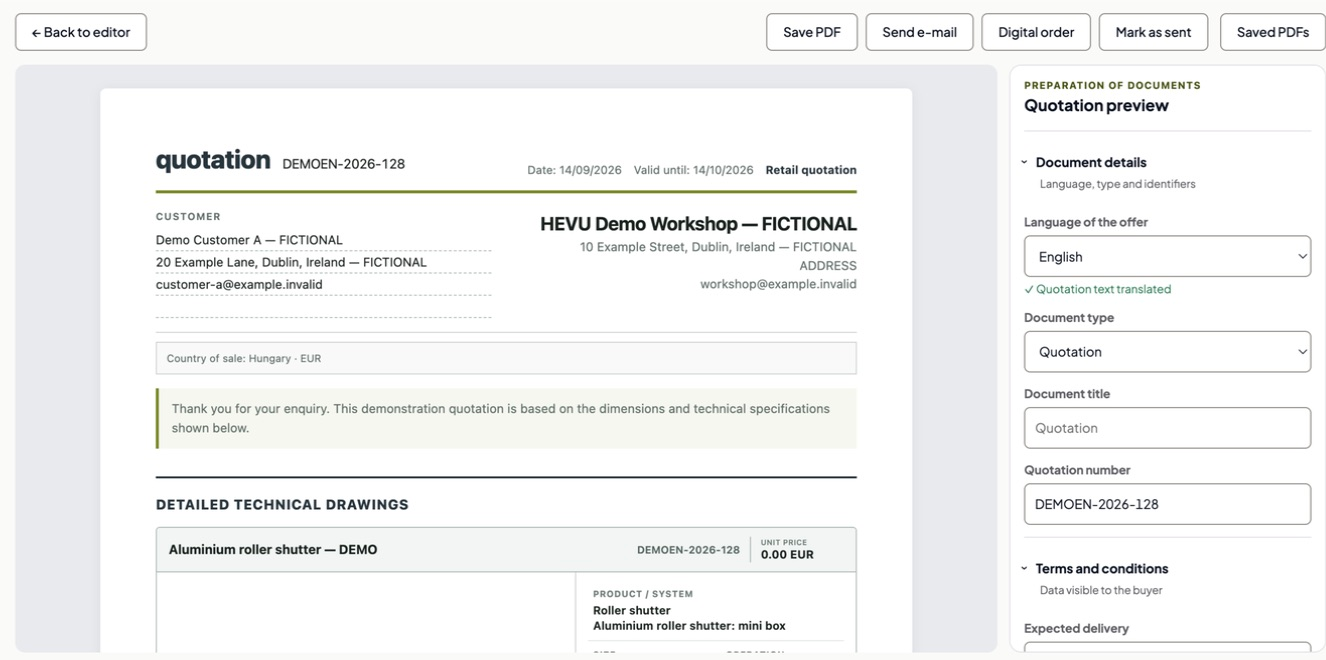
PDFs with your company details and logo give your quotes a consistent presentation. Products, prices and technical drawings can appear together, helping the customer understand what is included. Taking care when you first enter the company details makes subsequent documents easier to prepare. Check the business name and contact information before sending, especially when the person you are speaking to represents a different company.

Contact →
Quotes with your own branding

Features / 02

Customer management alongside your quotes

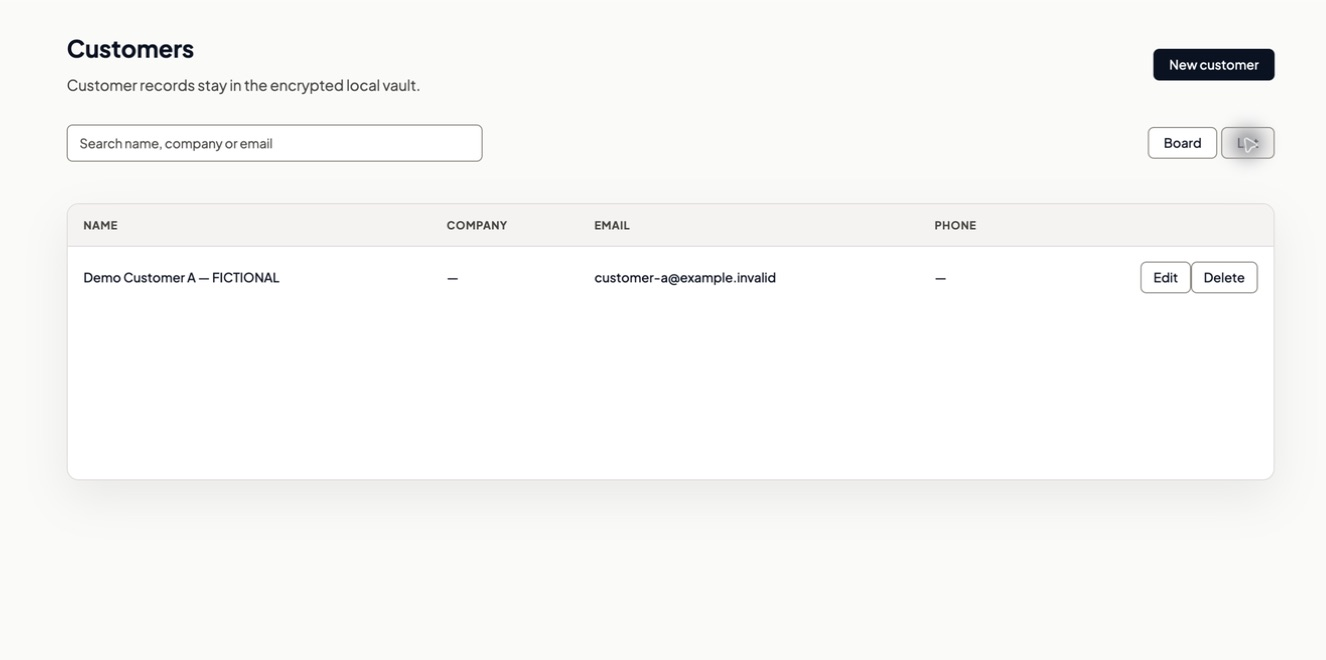
The built-in CRM keeps customer contact details, related quotes and internal customer notes together. When a customer returns, you can review the history instead of relying on memory. Notes written for internal customer management remain in the CRM. The text intended for the customer’s quote is managed separately, so you can organise your work without mixing internal discussions with the document you send.

Contact →
Customer management alongside your quotes

Features / 03

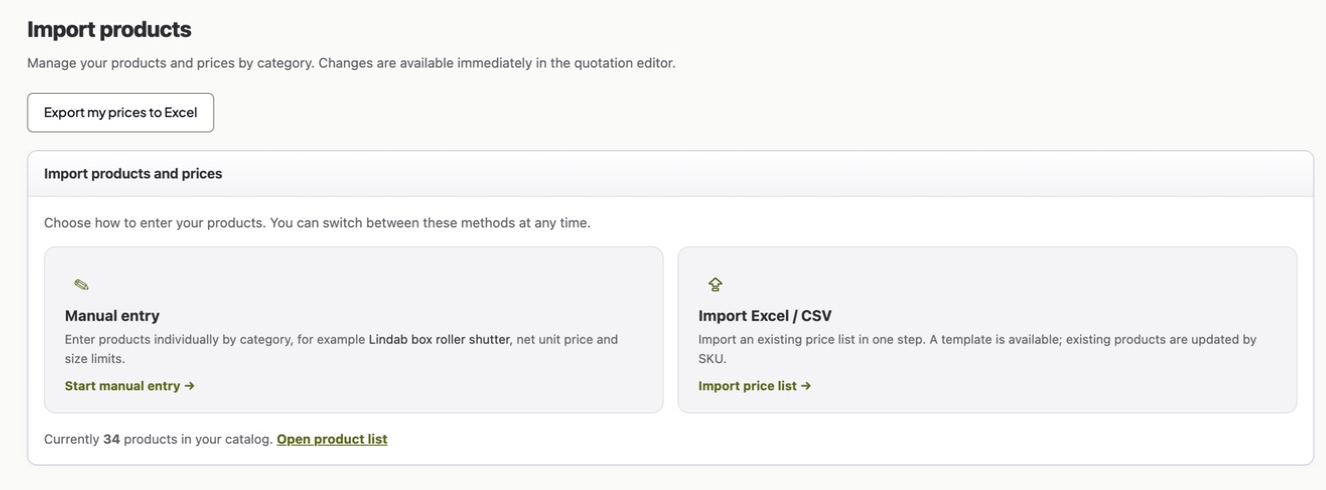
Your price list, with Excel and CSV import

Work with your company’s own products and prices. You can import a price list from Excel or CSV and organise the products in the catalogue. After importing, review product names, units and prices before sending a customer quote. HEVU calculates using the business data you provide. Testing a familiar product first helps you check that the imported information produces the result you expect.

Contact →
Your price list, with Excel and CSV import

Features / 04

Technical specifications in millimetres

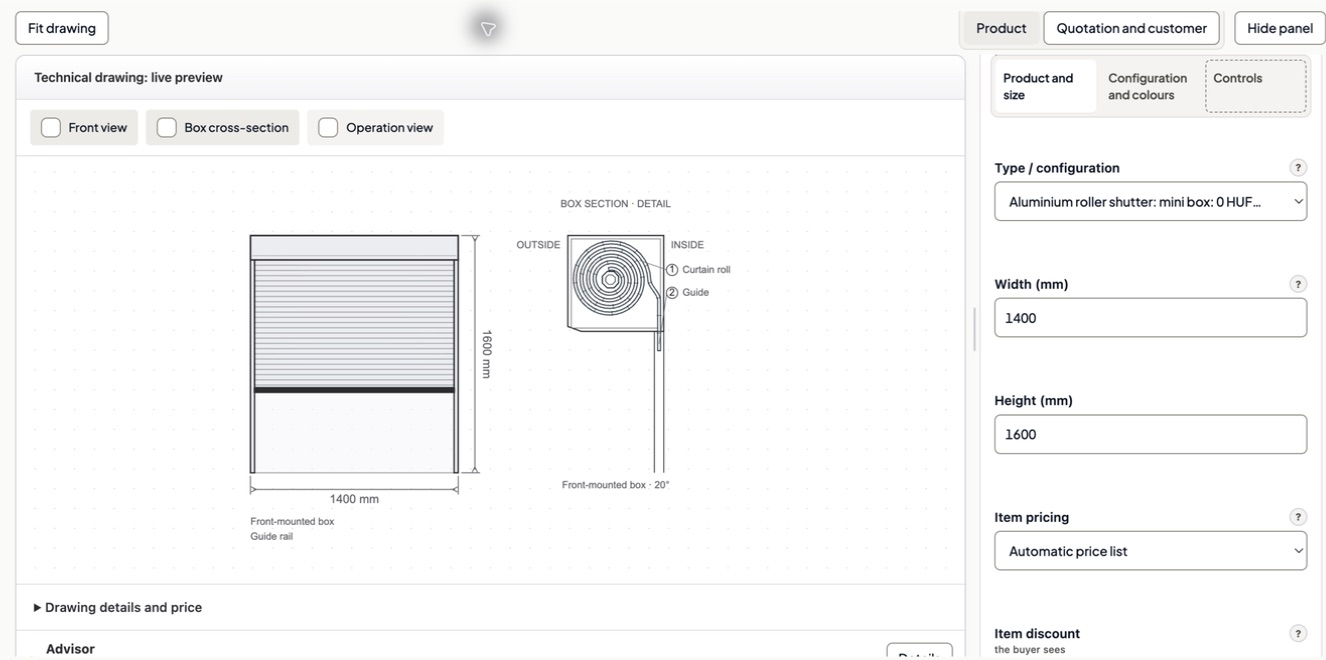
Enter dimensions in millimetres and use the drawing to review the configuration. For supported products, the front view, box cross-section and operating view show the related details. You can check the technical solution as well as the total price while preparing the quote, and clarify anything that needs attention before sending. The drawing supports this review; it does not replace a site survey or manufacturer approval.

Contact →
Technical specifications in millimetres

Features / 05

Multilingual PDF quotes

Choose the document language to suit your customer, independently of the interface language. Translation helps you work with partners who use another language; online translation requires an internet connection. Before sending, check the technical content, particularly custom product names and your own text. These describe the details of your range, so a final review remains useful even when the rest of the document follows a standard format.

Contact →

HEVU

Your products, your prices, your logo.

Calculated with your prices

Features / 06

Work orders and production preparation

Keep the work connected to a quote in view as the job progresses. Work orders and production preparation help make the technical and commercial background available for the next stage. Before a final production decision, the site measurements, configuration and current manufacturer requirements still need checking. Having the quote information together gives that review a clearer starting point and helps identify details that require confirmation.

Contact →

HEVU

Your products, your prices, your logo.

Calculated with your prices

Features / 07

Connections between manufacturers and dealers

Work with several partner companies through the partner features. A manufacturer can publish product data in a shared catalogue for authorised partners. Your local range can be kept separate from products supplied through a partner. Sharing is an online function: the catalogue information you publish is also sent to the partner service. Review the selected products and shared prices before making them available to other businesses.

Contact →

HEVU

Your products, your prices, your logo.

Calculated with your prices

Features / 08

An encrypted local workspace

HEVU is a desktop application that stores its workspace in encrypted files on your own computer. Managing local customer records, quotes and your own price list does not depend on automatically copying the entire workspace to cloud storage. Online services transfer specific data separately. The next section explains these distinctions so you can understand both where the primary working data lives and which features use the internet.

Contact →

HEVU

Your products, your prices, your logo.

Calculated with your prices

Automation

Motors, controls and accessories are part of the complete solution. Link the available items in your range to the relevant product and include them in the quote. Supported configuration checks help highlight differences that need attention, while the manufacturer’s instructions and professional approval remain important. This keeps the controls visible in the commercial discussion instead of leaving them as an assumption outside the quoted specification.

HEVU

Your business workspace stays on your computer.

We understand that a price list, a custom product range or a customer quote contains sensitive commercial information. HEVU therefore runs as a desktop application on Windows and macOS. Its encrypted local workspace files are stored on your computer, rather than in a cloud service that automatically mirrors the entire workspace.

You enter your own prices for calculation, combining them with the product configuration to build your quote. Local customer records, quotes and CRM notes support your daily work. Accounts, access checks and the online services you choose to use still operate over the internet. It is therefore important to distinguish local storage from the data transfers required by those services.

What does HEVU use the internet for?

The technical engine receives the dimensions and configuration needed for its calculations. The application filters out customer and pricing fields that do not belong in that request. Some checks also transmit product names, item codes and technical properties. The technical endpoint does not save the geometry as a server-side workspace. This describes that calculation service specifically, rather than promising that no HEVU feature ever sends business information online.

For PDF translation, the text to be translated is sent to an online translation service. When you share an online quote, you also transfer the quote information needed to display it. If you publish a manufacturer catalogue for partners, the selected catalogue data, including shared prices, becomes part of the online partner service. These features need to be considered separately from the encrypted local workspace.

Local storage does not mean completely offline operation. The distinction is that your computer holds the primary working copy of your day-to-day business data, while online features use specific information. Protect your computer and maintain backups as well: local storage does not replace either measure. Signing in on a different computer does not automatically transfer the business data from your existing local workspace.

HEVU

From independent dealers to manufacturers.

For dealers and distributors

Prepare quotes with your own prices and branding, while keeping customer information and history in the CRM. Work with multiple manufacturers or partner companies through the catalogues available within authorised partner relationships. Your customer work and supplier relationships can connect to the same quotation process. The available partner access depends on the relationship and the catalogue the partner chooses to share.

For manufacturers

Organising your range and publishing a partner catalogue helps you coordinate with dealers. Authorised partners can work with shared product data, while technical information for quotes can be prepared in a clearer form. Publishing a catalogue is online sharing, so review the information and prices you intend to make available first. Your local product range and the selection you publish are distinct considerations.

For designers

Measurements and technical views help explain the selected solution. While preparing a quote, you can review the configuration alongside the information intended for the document. HEVU supports this process; checking the architectural design, suitability for the site and any required specialist approval remains the responsibility of the appropriate professional. Use the configuration as a basis for discussion rather than a substitute for those checks.

For installers

Customer, quote and related work order information help you prepare the next task. Before starting a job, review the dimensions and configuration on which the quote was based. Record site changes and the outcome of discussions according to your own process, so the next stage uses current information. Keeping the original quote accessible also helps explain why a detail may need to be confirmed again.

HEVU

Developed with shading businesses.

Our team is working to make HEVU the gold standard of the shading industry. Start now and help shape what comes next.

Ask. Explore. Decide.

Is it right for your business?
See what it brings to your work.

Choose a key business question. Get a concise answer from the HEVU knowledge base and see how it fits the way your company works.

Automatically rotating questions

How much money can HEVU save me?

Choose a question

More questions

HEVU knowledge base / Verified answer

How much money can HEVU save me?

HEVU brings separate quotation tasks into one interface: your own pricing, technical drawings and company PDFs. Actual savings depend on your workflow; assess them with your own price list and a real quotation.

Source: Documentation ↗
✓ Your products, your prices, your logo.✓ Monthly software licenceWindows + macOS
What to know before you start.

How much money can HEVU save me?

HEVU brings separate quotation tasks into one interface: your own pricing, technical drawings and company PDFs. Actual savings depend on your workflow; assess them with your own price list and a real quotation.

Source ↗

What exactly is it for?

Technical drawings, your own prices and branded PDFs. One connected workflow. Quotation software for shading companies on Windows and macOS.

Source ↗

Does it work with my price list?

Import your products and prices from Excel or CSV. HEVU calculates from your data, not someone else’s catalogue.

Source ↗

Can I customise it?

Import your products and prices from Excel or CSV. HEVU calculates from your data, not someone else’s catalogue. Choose the PDF language independently of the interface. Include your logo and company details in a consistent layout.

Source ↗

How much does it cost?

40.86 EUR per user per month, excluding applicable VAT. Free for 14 days, then 40.86 EUR per user per month, excluding applicable VAT. We offer enterprise packages with favourable terms for multiple licences. Request a tailored quotation.

Source ↗

Why isn’t Excel enough?

Dimensions → Drawing → Your prices → Branded PDF. The built-in CRM keeps contact details, quotes and internal notes together. Pick up from the history on your next call.

Source ↗

Where is my data stored?

HEVU is desktop software that stores your workspace encrypted on your computer. Only data needed for a specific function goes online: technical calculations, translation or sharing.

Source ↗

Do I need internet?

Yes, for sign-in, technical calculations, translation and sharing. The workspace is local, but HEVU is not fully offline.

Source ↗

How long does setup take?

Request access, then download the Windows or Mac installer from your approved account. Set up your company details and price list afterwards.

Source ↗

How much does HEVU cost?

40.86 EUR per user per month, excluding applicable VAT. Free for 14 days, then 40.86 EUR per user per month, excluding applicable VAT. We offer enterprise packages with favourable terms for multiple licences. Request a tailored quotation.

How do I install it?

Request access, then download the Windows or Mac installer from your approved account. Set up your company details and price list afterwards.

Do I need an internet connection?

Yes, for sign-in, technical calculations, translation and sharing. The workspace is local, but HEVU is not fully offline.

Where is my data?

In an encrypted file on your computer. Only data needed for the specific function goes online.

Which languages are available?

The website is available in 9 languages. You can choose the software and PDF quote languages separately.

What happens when I change computers?

Use the built-in backup and restore to transfer your workspace. Signing in alone does not transfer local data.

Where can I get help?

In your account’s Support area, through the contact form or in the Documentation.

Do I need separate training?

HEVU’s built-in, restartable guide takes you through company setup, price entry, a complete quotation, PDF creation and work planning without separate training. Practise with your own data; contact us if you need help.

Can I get a refund?

EU and EEA consumers may withdraw and request a full refund of the first payment within 14 days after the first payment following the trial. Business purchases have no general money-back guarantee. Remedies for faulty service and other mandatory rights remain available. See the cancellation and refund policy for details.

Contact

Tell us about your business.

Tell us what you work with and where you need help.

info@hevu.eu ↗

Your products, your prices, your logo.

Contact

Do not include passwords, license keys or your customers’ personal data.